Create SQL Server Connection
Builds a SQL Server connection string at runtime from values you supply as inputs. Use this action when the target server, database, or credentials are not known at design time — for example, a multi-tenant Flow that runs against a different customer database on each execution, or an environment selector that switches between Dev, Test, and Prod.
The resulting connection is consumed by setting the Dynamic connection property of other SQL Server actions. Dynamic connection overrides the static Connection for the current execution.
If you store the credentials for the SQL Server outside Flow (for example in your own Azure SQL or PostgreSQL database), use this action to dynamically create a connection. The connection returned from the action must then be used as the input to the Dynamic connection property of other SQL Server actions.
Example 
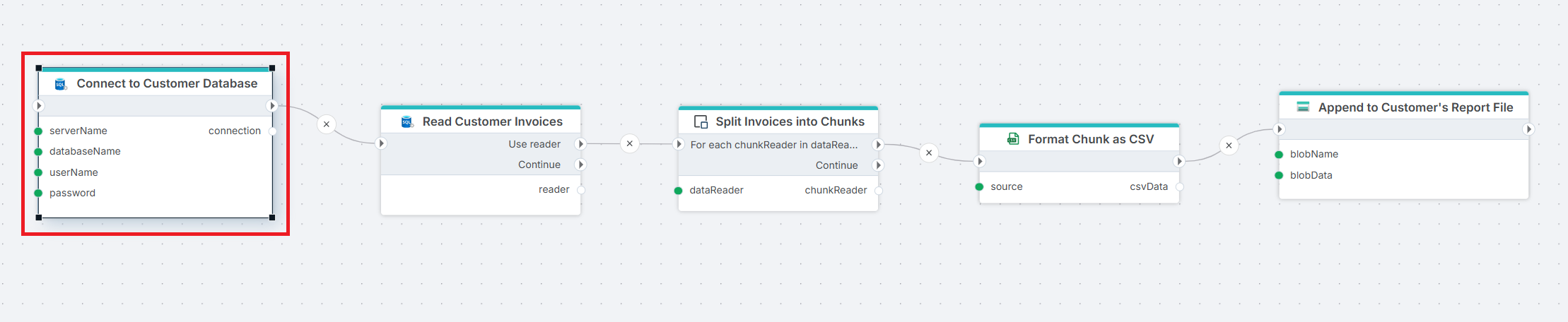
This flow exports invoices from a customer's database to a CSV file in blob storage — a multi-tenant pattern where the source database is different for each Flow execution. Create SQL Server Connection builds the connection from the inputs and exposes the result on its connection output. Get DataReader reads rows from the source table. Split Invoices into Chunks divides the stream into smaller batches, and Format Chunk as CSV serializes each batch. Append to Customer's Report File appends each chunk to a blob. Use this pattern whenever the target database is resolved at runtime — multi-tenant exports or environment selectors that run the same Flow against different databases.
Connection properties
Connection type
A connection type (also called authentication type) must be selected before entering the other properties.
- SQL Server Authentication – Use a SQL Server username and password. (Default)
- Microsoft Entra Password – Authenticate with a Microsoft Entra identity using a username and password (MFA may be required).
- Microsoft Entra Service Principal – Authenticate with a Microsoft Entra service principal using its client ID and secret.
- User Connection String – Supply a full connection string.
SQL Server and Microsoft Entra Password authentication
| Name | Required | Description |
|---|---|---|
| Server name | Yes | The name of the SQL Server. This can be the server name, IP address, or a named instance. |
| Database name | Yes | Defines the specific database on the SQL Server to which the connection is made. |
| Username | Yes | The username (or Entra ID/email) used to authenticate the connection. |
| Password | Yes | The password associated with the user to authenticate the connection. |
| Enable Multiple Active Result Sets | No | This setting allows a single database connection to run multiple queries at the same time, without waiting for one to finish before starting another. Read more |
| Timeout | No | Connection timeout in seconds (default 30 seconds) |
Microsoft Entra Service Principal authentication
| Name | Required | Description |
|---|---|---|
| Server name | Yes | The name of the SQL Server. This can be the server name, IP address, or a named instance. |
| Database name | Yes | Defines the specific database on the SQL Server to which the connection is made. |
| Client ID | Yes | The Client ID of the Microsoft Entra service principal (also known as an app registration). |
| Client secret | Yes | The client secret (application secret) associated with the service principal in Microsoft Entra. |
| Enable Multiple Active Result Sets | No | This setting allows a single database connection to run multiple queries at the same time, without waiting for one to finish before starting another. Read more |
| Timeout | No | Connection timeout in seconds (default 30 seconds) |
User Connection String
| Name | Required | Description |
|---|---|---|
| Connection String | Yes | A full connection string that can be used to establish a SQL Server connection. |
| Username | No | The username used to authenticate the connection (if not in the connection string). |
| Password | No | The password associated with the user to authenticate the connection. If kept out of the Connection String, it will be encrypted and stored safely. |
Returns
A SQL Server connection variable named according to the Connection variable name property (default: connection).