Tripletex Connection
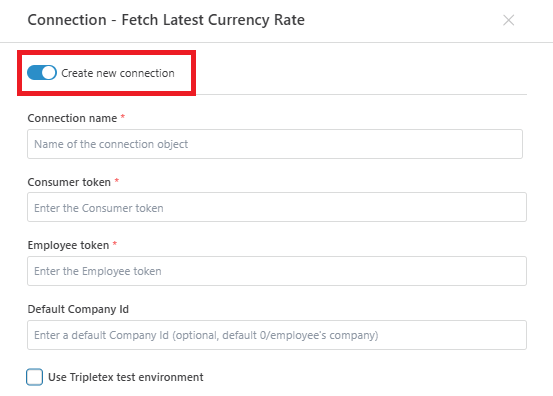
A workspace object that holds the credentials Flow uses to call the Tripletex REST API: a consumer token, an employee token, and the target company. Configure it once, then select it from the Connection dropdown on any Tripletex action.
Use this static connection when the same credentials apply to every run of the Flow. If credentials must be supplied per execution — for example from a secrets store or because the Flow targets a different Tripletex subscription on each run — use the Create Tripletex Connection action instead.
Prerequisites
- A Tripletex account with API access enabled.
- A consumer token registered for the integrating application. The consumer token is issued by Tripletex when an integration is registered.
- An employee token identifying the Tripletex user the connection acts on behalf of. The employee's entitlements set the upper bound of what this connection can do.
- For accountant integrations: client access established and entitlements assigned to the employee, per the Tripletex authentication documentation.
Important
The Employee token determines what the connection can read and write. If the Tripletex user has restricted permissions (e.g. read-only on customers, no access to ledger), request actions using this connection will return 403 for forbidden endpoints. The error surfaces on the request action, not on the connection itself.
Properties
| Property | Required | Description |
|---|---|---|
| Name | Yes | Display name of the connection. Appears in the Connection dropdown on Tripletex actions and in logs. |
| Consumer token | Yes | A token used to authenticate the consumer. |
| Employee token | Yes | Token identifying the Tripletex user the connection acts on behalf of. Its entitlements determine what the connection can read and write. Stored as a protected secret. |
| Default Company Id | No | Tripletex company ID applied to requests that do not specify one. Leave empty to default to 0, which resolves to the company the employee token belongs to. Set explicitly only in multi-company setups where accountant access spans tenants. |
| Use Tripletex test environment | No | Routes requests to the Tripletex test environment (api-test.tripletex.tech) instead of production (tripletex.no). Test-environment tokens only work with this enabled; production tokens only work with it disabled. |
Configuration
Creating a connection
- From a Tripletex action: add any Tripletex action to a Flow, open the Connection dropdown in its property panel, and click Create new connection.
Testing the connection
The Test connection button calls the Tripletex authentication endpoint with the supplied tokens and reports the result without saving the connection. Use it to verify that:
- The consumer and employee tokens are valid.
- The token pair matches the selected environment (production vs. test).
- The employee user has API access enabled.
A failed test does not block saving — the connection can still be created with invalid tokens, but downstream request actions will fail at runtime.
Editing a connection
To edit an existing Tripletex Connection, click on the action -> connection and select edit, or go to Resources → Workspace Objects in the Designer top bar and locate the connection. Changes apply to every Flow that references it. See Workspace Objects for details.
See also
- Create Tripletex Connection — the runtime counterpart: builds a
Connectionfrom credentials supplied as inputs, overrides the static connection per execution. - REST API Request with paging — the most common consumer of Tripletex connections.
- Tripletex authentication documentation — how to obtain consumer and employee tokens, including the accountant-token flow.