HTTP Authentication
We currently support the following HTTP Authentication types for making generic HTTP requests:
When making requests to an API that requires authentication, you need to first learn which authentication types are supported by the API.
Authentication is configured with the Authentication property of the HTTP request, HTTP get file, HTTP send file and Get sitemap actions. Each authentication configuration is given a Name and stored in the workspace, so you can define it once and reuse it across actions and Flows. You can use Workspace Variables to avoid hard-coding credentials.
The credentials are added to the Authorization header of the request. If you have already defined an Authorization header in the action's Headers, it is not overwritten.
Basic Authentication
Basic Authentication is a simple and widely-used method for enforcing access control on web resources. It is a part of the HTTP protocol and is often used to authenticate clients to servers. The key idea behind Basic Authentication is to send a user's credentials (username and password) in a straightforward manner to authenticate and authorize the client’s access to the requested resource.
While easy to implement, it lacks the security features of more modern authentication methods, making it suitable only for specific, low-risk scenarios or when used with HTTPS to secure the credentials during transmission.
| Property | Description |
|---|---|
| Username | The username used to authenticate. |
| Password | The password used to authenticate. |
Flow encodes the credentials and sends them in the Authorization: Basic <credentials> header.
OAuth2 Client Credentials
The OAuth 2.0 Client Credentials flow is an authorization mechanism used by applications (clients) to obtain an access token directly from an authorization server without requiring user interaction. This flow is typically used for server-to-server communications, where an application needs to access resources or perform actions on behalf of itself rather than a user.
In the Client Credentials flow, the client (an application) authenticates itself to the authorization server using its own credentials (client id and client secret). Upon successful authentication, the authorization server issues an access token that the client can use to access the protected resources (APIs).
| Property | Description |
|---|---|
| Token endpoint | The url of the token issuer, for example https://login.microsoftonline.com/{entra tenant id}/oauth2/v2.0/token. |
| Client Id | The client ID of the application. |
| Client secret | The client secret of the application. |
| Scope | (Optional) Many, but not all, APIs requires a valid scope as part of the authentication request. The scope defines the resources the application needs to access. You must refer to the API documentation to find the valid scope (if any). |
| Additional parameters | (Optional). Some Identity Providers require additional pararameters to issue access tokens. For example, Auth0 requires the audience parameter (but not scope). Other Identity Providers may require different parameters. Use this option to specify provider-specific authentication parameters. |
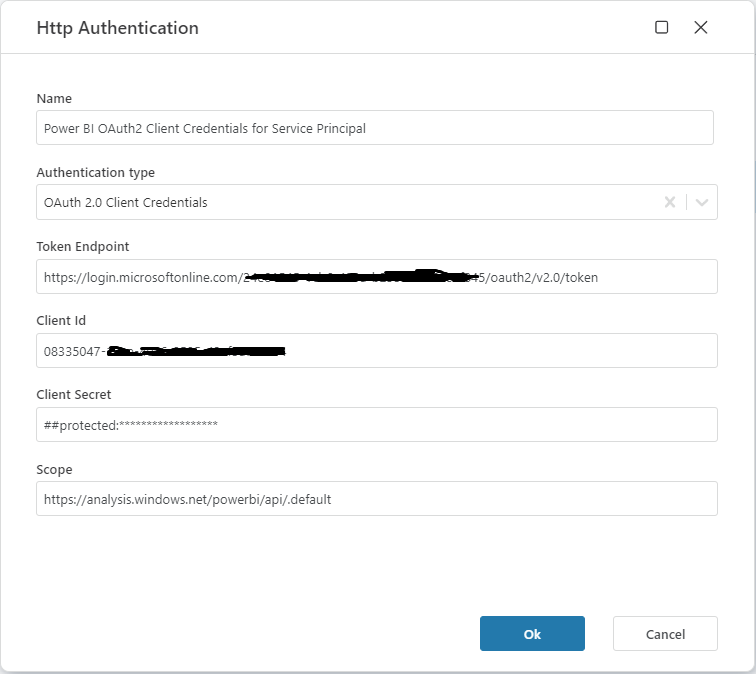
Example - Dynamics 365 Business Central
The example below shows sample values for how to configure OAuth2 Client Credential authentication to Dynamics 365 Business Central.
The values for Tenant Id, Client Id and Client secret below are totally fictional, but Scope is the actual value required to access the API.
- The
Token endpointcontains the tenant id of your Microsoft Entra Tenant. Client Idis the Microsoft Entra application (registration) id.Client secretis a client secret for the Microsoft Entra application.Scopeis the value used to request access to call the Dynamics 365 Business Central API.
| Property | Description |
|---|---|
| Token endpoint | https://login.microsoftonline.com/eddb6a53-c923-4422-bd4e-0b2117078dd3/oauth2/v2.0/token |
| Client Id | cdcbca52-c721-3122-bd4e-0b2117078dd3 |
| Client secret | A7U7Q~vsc.PjTnq54sa2IScMGnQ4pOUWCgSgTaYM |
| Scope | https://api.businesscentral.dynamics.com/.default |
Example request
GET https://api.businesscentral.dynamics.com/v2.0/eddb6a53-c923-4422-bd4e-0b2117078dd3/test/api/v2.0/companies
Bearer token
Use Bearer token authentication when the API gives you a static access token or API token, for example a personal access token or a long-lived API key that must be sent as a bearer token.
| Property | Description |
|---|---|
| Bearer token | The token to send to the API. |
Flow sends the token in the Authorization: Bearer <token> header.
Note
If the API issues short-lived access tokens from a token endpoint using a client ID and client secret, use OAuth2 Client Credentials instead. Flow will then request, cache and renew the access token for you.