Check if table exists
Checks whether a table exists in a SQL Server database and returns true or false. Use this to branch your Flow based on table state — for example, to create a table on the first run and truncate it on subsequent runs, preventing errors from missing or duplicate tables.
When to use this
- Before loading data, to decide whether to create the target table or truncate existing rows.
- In deployment or migration Flows that set up database objects only if they don't already exist.
- To guard actions like Truncate Table or Delete Table that fail when the table is missing.
How it works
- Input: A table name and a SQL Server connection.
- Output: Routes to the True output port if the table exists, or the False output port if it does not. The Continue output port fires regardless of the result.
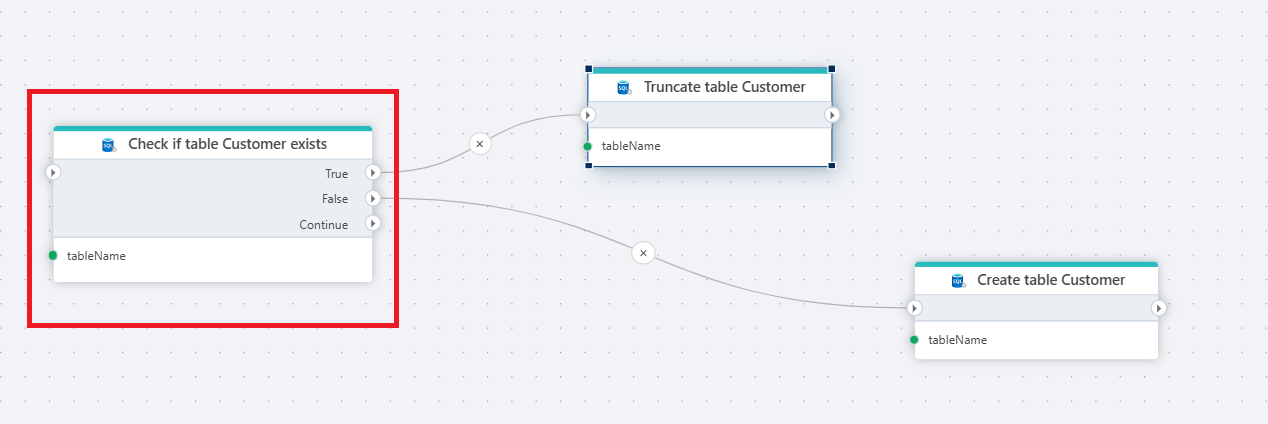
Example 
This flow prepares a Customer table before loading data. Check if table Customer exists queries the database and branches on the result. If the table exists (True), Truncate Table clears the existing rows. If it does not (False), Create Table creates it from scratch. Use this pattern at the start of data-loading Flows to guarantee the target table is present and empty without failing on the first run or duplicating data on subsequent runs.
Properties
| Name | Required | Description |
|---|---|---|
| Title | No | A descriptive title for the action. |
| Connection | Yes | The SQL Server Connection to the target database. |
| Enable dynamic connection | No | When enabled, uses a connection created at runtime by Create Connection. Use this when the target database varies between runs. |
| Table name | Yes | The name of the table to check for. |
| Command timeout (seconds) | No | Maximum execution time in seconds. The action fails with a timeout error if exceeded. Default is 120 seconds. |
| Disabled | No | When checked, the action is skipped during Flow execution. |
| Description | No | Additional notes or comments about the action or configuration. |
Returns
Boolean. true if the table exists, false otherwise. The result is routed to the True or False output port of the action node.
## See also
- Create Table — creates a new table in a SQL Server database.
- Truncate Table — removes all rows from a table without dropping it.
- Delete Table — removes a table from the database entirely.
- Connection — how to set up a SQL Server connection.
SQL Server: Videos / Getting started
This section contains videos to help you get started quickly working with Azure SQL / SQL Server using Flow.
Dump CSV file from Azure Blob container to Azure SQL table
This video demonstrates how to import all records from a CSV file into an Azure SQL table.
In the demo, no data import options (such as data type conversion, number or date formatting) are specified, meaning the data is imported as raw text.