Get entities
Executes a SQL query against a SQL Server database and returns the results as a typed list of .NET entity objects. Each row in the result set is mapped to an entity with properties defined in the Entity properties configuration.
Use this when you need the full query result as a strongly-typed collection that downstream actions can iterate over, filter, or transform — for example, to modify each entity in a Function action and then save the changes back.
An entity is a .NET object with one or more properties:
public record Customer(string VATNumber, string Name, string Address);
This action returns a list of such entities:
List<Customer> customers;
When to use this
- To retrieve a collection of records from a query and pass them as a typed list to downstream actions for transformation or processing.
- When you need random access to the full result set (unlike Get DataReader which is forward-only).
- To feed a list of entities into a ForEach loop where each entity is modified by a Function action.
Note
This action loads all results into memory as a list. For large result sets, consider Get DataReader with chunked processing instead.
How it works
- Input: A SQL query (with optional parameters), an entity name, and an entity properties mapping that defines how result columns map to entity properties.
- Processing: Executes the query, maps each result row to a typed entity object, and collects all entities into a list.
- Output: Returns the list as a Flow variable specified in Result variable name. The type is
List<EntityName>whereEntityNameis the value of Entity name.
Example 
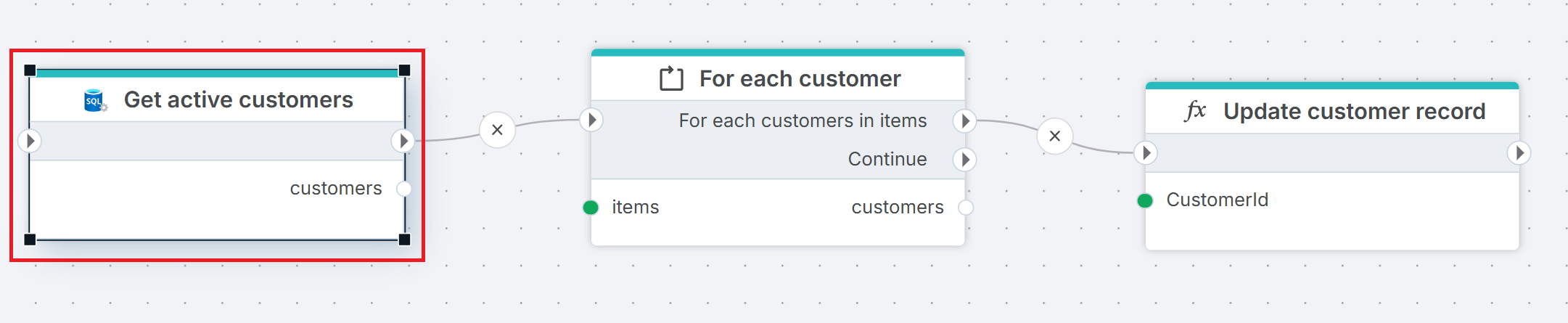
This flow recalculates discounts for active customers. Get active customers queries the Customers table and returns a List<CustomerEntity> in the customers variable. For Each iterates over the list, and for each entity Function applies the recalculation logic in Update customer record. Use this pattern when you need the full result set as a typed collection — for example, when downstream actions reference entity properties directly in code.
Properties
| Name | Required | Description |
|---|---|---|
| Title | No | A descriptive title for the action. |
| Connection | Yes | The SQL Server Connection to the target database. |
| Enable dynamic connection | No | When enabled, uses a connection created at runtime by Create Connection. Use this when the target database varies between runs. |
| SQL expression and parameters | Yes | The SQL query to execute, with optional parameters. Supports parameterized queries and Flow variable interpolation. |
| Entity name | No | The name of the generated entity type (e.g. MyCustomerEntity). This becomes the class name of the mapped .NET object. |
| Entity properties | Yes | Defines how result columns map to entity properties. Click the edit icon to open the mapping editor. See Entity properties below. |
| Result variable name | Yes | The name of the Flow variable that holds the returned list. Default is entities. Downstream actions reference this variable to access the entity collection. |
| Result data type | No | The generated type name for the list (e.g. List<MyCustomerEntity>). Derived automatically from Entity name. |
| Command timeout (seconds) | No | Maximum execution time in seconds. The action fails with a timeout error if exceeded. Default is 120 seconds. |
| Disabled | No | When checked, the action is skipped during Flow execution. |
| Description | No | Additional notes or comments about the action or configuration. |
Entity properties
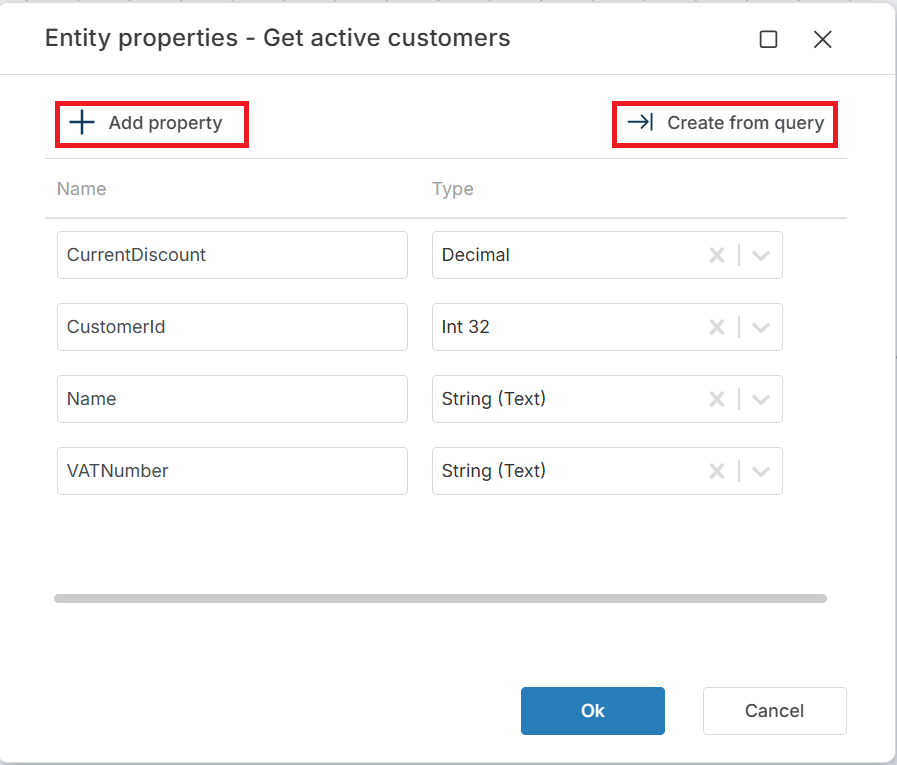
Click the edit icon next to Entity properties to open the entity properties editor. You can define properties manually with + Add property, or click Create from query to generate the mapping automatically from the query result columns.
Each property has two fields:
| Field | Description |
|---|---|
| Name | The property name on the entity object (e.g. CustomerId, Name). Must match or map to a column in the query result. |
| Type | The .NET data type for the property (e.g. String (Text), Int 32, Decimal). Nullable types are available for columns that can contain NULL. |
Tip
Use Create from query to avoid manual mapping. It executes the SQL query and generates the property list from the result columns automatically.
Returns
A List<T> of typed entity objects with properties specified by the Entity properties configuration. If the query returns no rows, the list is empty (zero items, not null).
See also
- Get Entity — retrieves a single entity from a query (first row only).
- For Each Row from Query — iterates over rows one at a time without loading the full result into memory.
- Get DataReader — returns a forward-only stream for large result sets.
- Get Single Value — returns a single scalar value from a query.
- Connection — how to set up a SQL Server connection.
SQL Server: Videos / Getting started
This section contains videos to help you get started quickly working with Azure SQL / SQL Server using Flow.
Dump CSV file from Azure Blob container to Azure SQL table
This video demonstrates how to import all records from a CSV file into an Azure SQL table.
In the demo, no data import options (such as data type conversion, number or date formatting) are specified, meaning the data is imported as raw text.